

Back in early 2024, I spent any spare time I had at work developing a Slack bot. I'd been working with PowerShell and APIs to automate just about anything I could get my hands on for a while by then, but I was still primarily building one-off automations. So, it might seem a bit strange that I spend about a month of free time developing a full scale Slack bot. I certainly dove directly into the deep end with this project, so let's get into it!
The Backstory:
Prior to 2024, we had been using a Slack bot called mspIC to link our PSA, ConnectWise Manage, to our Slack instance. It had quite a few capabilities, but we relied on it for 3 core features: It's ability to send ticket updates to technicians, remind technicians of upcoming scheduled appointments on their tickets, and post ticket data into public channels for team discussions. It was one of those things that, on the surface, didn't seem that key to our workflow. But, when the creator behind mspIC, a former user of CW Manage and fellow tinker, decided that he was no longer going to support the product and would be taking the servers offline, it was a bit of an issue for us.
My immediate reaction was to see if I could petition leadership to reach out to the owner of mspIC and see if he was interested in selling the product so we could take up ownership of the tool. Sadly, that wasn't something the creator was interested in. He used to be in the IT field and had created mspIC as a labor of love, but had moved into telephony a few years prior and had only been maintaining the bot as a side job. At a certain point, he felt it was no longer a good use of his time, and since he wasn't in IT anymore, the interest in the bot just was no longer there.
Okay, so mspIC was going away and there wasn't much we could do about it. I'd asked my boss and was told we were paying a fairly small amount for the tool, and there wasn't any budget to seek out something new, if a similar tool even existed. It was looking like we'd need to adjust some key workflows and live without this bot. At least, that was until I gave the situation some more thought and had a realization. I'd spent enough time working with the CW Manage API that I felt I could replicate what mspIC was doing, and was confident in Slack's maturity as a product that it would have similarly user-friendly APIs. After all, mspIC made it happen. Why couldn't I? And so, I took up the mantle of creating our own, in-house version of mspIC: SYNic.
Key Functionality 1 - Getting Ticket Data into Slack:
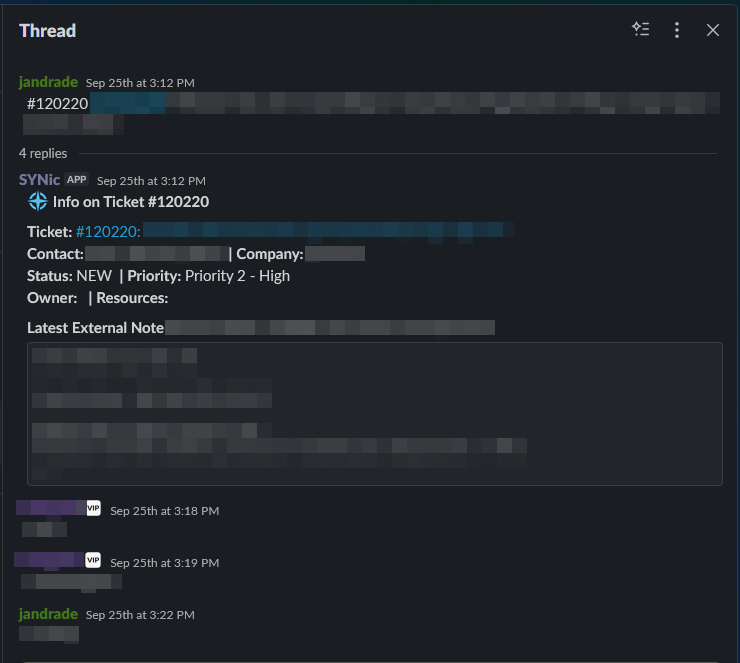
The first of the key functionalities that we'll touch on here is getting ticket data into Slack. It's a pretty simple and obvious sounding feature, but it's an important component in the daily workflow of multiple teams. At the end of the day, we're an MSP, and at the core of that, is our PSA. We spend all day in Slack, so data from the PSA needs to be easily brought into Slack so the team can have well informed discussions. We make heavy use of threads in Slack, so the workflow is simple: when a new discussion needs to be had, the initiator will make a post in Slack containing the ticket number and information on the topic for discussion. This facilitates well organized communication that's easily searchable by ticket number. And if you know anything about Slack, clean and easily searchable aren't things to be taken for granted.
Anytime the specific format #123456 appears in a new Slack message outside of an existing thread, SYNic identifies that pattern and gets to work. SYNic looks for new messages that contain that pattern via regex and when it identifies a ticket number, it sends it off to the next endpoint. That endpoint takes the ticket number and reaches out to the ConnectWise Manage API /service/tickets endpoint to get data on the ticket. It also petitions the /service/tickets/{parentId}/notes endpoint to get the latest note on the ticket. That data gets parsed for key information such as Contact, Company, and Status. Finally, that data is all compiled into a single, formatted message that gets sent off to Slack's chat.postMessage endpoint to respond to the original post in a thread.
Key Functionality 2 - Sending Ticket Updates to Team Members:
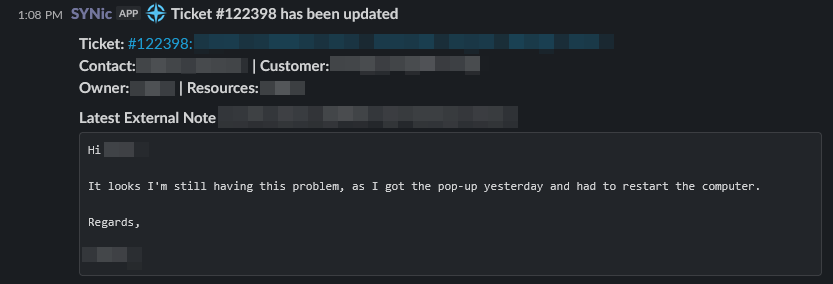
SYNic needed to be able to send updates on tickets to the resources assigned to said ticket. This ensures that team members are kept up to date when any of their tickets are updated, changed, or when a client responds. SYNic provides quick insight as to the nature of the update right within Slack so it can be evaluated and handled appropriately.
This functionality is driven by ConnectWise Manage sending a callback anytime there is a change to a given service board. SYNic receives these callbacks, parses them for ones we need to take action on, and sends that off to the next step. The body of the callback itself is light on details, so we isolate the ticket number and reach out to our old friend the /service/tickets endpoint. From there, SYNic needs to determine who to send the update to based on the resources assigned to the ticket. Since this isn't a Slack-initiated flow, we need a way to match the assigned resources in Manage with the same resources in Slack so we can the update. SYNic makes use of Azure Tables for storing data such as channel IDs. It queries the appropriate Azure Table for the channel ID for the user's personal instance of SYNic. This allows it to send messages directly to users in their own private SYNic channel.
Key Functionality 3 - Upcoming Appointment Reminders:
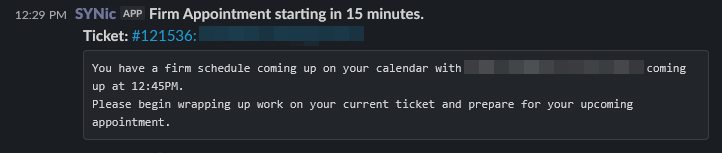
The final key functionality is reminders for upcoming appointments each team member has been scheduled for in CW Manage. For this functionality, SYNic makes use of an Automation Account for scheduled, regular checks of upcoming appointments; the Automation Account is used to send scheduled API calls to the Function App. Once received, SYNic searches each open ticket for schedule entries. If it finds any that are coming up in the next 15 minutes, it marks those as actionable and goes through a similar process to the ticket updates where it'll compile the ticket data and send a private message to the scheduled resource, reminding them of their upcoming appointment.
Speed and Timeout Errors:
With Slack bots, the primary method of triggering an action is a slash command. To give a simple example, one of mspIC's simpler functions that I replicated was the ability to let the team know when you're taking your lunch. This allows team members to coordinate their lunches and ensure that key roles aren't left unattended with multiple people away from their desks. In mspIC the command /lunch would get sent into a public channel. That triggered a series of actions including sending a message to a specified channel letting everyone know the user was stepping away for their lunch and when they'd be back, setting their status in Slack for the duration of their break to a lunchbox emoji, and adding a schedule entry to the user's ConnectWise calendar noting they'd taken their break.
Because it seemed relatively simple compared to some of mspIC's other functions, /lunch was actually one of the first things I'd built for SYNic. I thought it'd be easy... I should have known better! I quickly learned that slash commands have a time limit on them. The REST API endpoint that the Slack calls when a slash command is run has to respond confirming receipt of the command within 3 seconds. If it doesn't get that conformation, Slack throws an error message to the sender of the command. That error proved to be quite a pain in the ass. I was receiving that error on almost every run of the command because the function app wasn't responding quickly enough. Through a combination of SYNic being written in PowerShell, and running on a Windows-based Azure Function App, it just wasn't fast enough. The command still eventually ran, but to the end user, it looked like it had failed. In testing, that led to users sending duplicate commands quite frequently, so I had to get creative and find a solution.

For your sake (and mine), I'll skip over the painful hours testing and troubleshooting and get right to the fun part; how I solved the issue. It was though completely ditching the slash commands to begin with. I couldn't get the function app endpoint to respond fast enough, and I couldn't change the timeout or error message on the Slack side. What I could do though, was setup a callback in the Slack bot to send an outbound webhook each time a message got sent to a specific channel. From there, I could receive that data, parse it for a specific pattern, and act on it. So, instead of /lunch, SYNic looked for the pattern !lunch. If Slack didn't know a command was being run to begin with, there wouldn't be any timeout messages! (This is also how #123456 works for returning ticket data in threads).

Looking Back, Hindsight is 20/20:
It's been a while now since I built SYNic, and while I've certainly made improvements to existing features, and even rolled out some completely new ones, I don't spend much time working on it anymore. For the most part, SYNic is self-sufficient and keeps chugging along with few issues. And given that I'd never done anything of this scale before, I'd say that's quite an accomplishment all on it's own. I dove into this project thinking I knew everything I needed to know and that it wouldn't be too challenging to replicate mspIC's core functionality. I finished this project having learnt that I knew far less than I thought I did, but also having learnt a ton.
If I was to do this again, I don't think I'd choose to use PowerShell as a language, and I would insist that the underlying compute for the serverless Function App be run on Linux and not Windows. Windows-based Function Apps are slow, particularly with cold starts, and while SYNic is our highest utilized Function App outside of our self-hosted CIPP instance, ultimately, we still don't have that much data going through it. Function Apps are intended to scale far beyond what we're doing with them, and SYNic barely brakes the surface in terms of their capability and capacity. Additionally, there are some functions and flows I'd structure differently given what I now know about Slack and Manage's respective APIs.
And all things considered, I'm thrilled the list of things that didn't work is as short as it is. Despite having never done anything of this scale before, SYNic works, and it even works well! I was successful in building my own Slack bot and my inner nerd is overjoyed that my whole company uses this bot I built every single day.

Member discussion: